Email
Email is one of three delivery channels — Telegram and Slack are the others. Each digest is rendered once and dispatched on every channel that has credentials configured; if your deployment only has Slack:botToken set, only Slack DMs go out, and the same goes for any other combination.
SMTP setup
Configure in appsettings.secrets.yaml (gitignored, sits next to appsettings.yaml in the Preesta install):
Smtp:
  Host:     smtp.gmail.com
  User:     you@example.com
  Password: "app-password-here"     # NOT your account password
  From:     you@example.com
  # Port: 0                         # optional; 0 = auto-pick by SecurityMode
  # SecurityMode: Auto              # optional; Auto|None|SslOnConnect|StartTls|StartTlsWhenAvailable
Host, User, Password, From are required. Port and SecurityMode are optional — by default Preesta picks the right port and auto-negotiates STARTTLS when the server advertises it. Override only when your provider expects a specific port or wire mode.
For unauthenticated relays (MailHog, local MTAs), omit both User and Password — Preesta skips the AUTH step entirely. Setting just one of the pair is a configuration error and Preesta fails loud.
Gmail
Gmail blocks regular-password SMTP. Generate an App Password: account → Security → 2-Step Verification (must be on) → App passwords → generate. Use that as Password. Host: smtp.gmail.com. Defaults cover the rest.
Other providers
Any SMTP-compliant server works — Office 365, Mailgun, SendGrid, Postmark, your company relay. Match the provider's documented host + auth; ports and security modes usually need no override.
Testing locally
Run MailHog in Docker (docker run -p 1025:1025 -p 8025:8025 mailhog/mailhog), point Preesta at Host: localhost, Port: 1025, SecurityMode: None, and leave User/Password unset. Browse sent messages at http://localhost:8025.
What gets sent
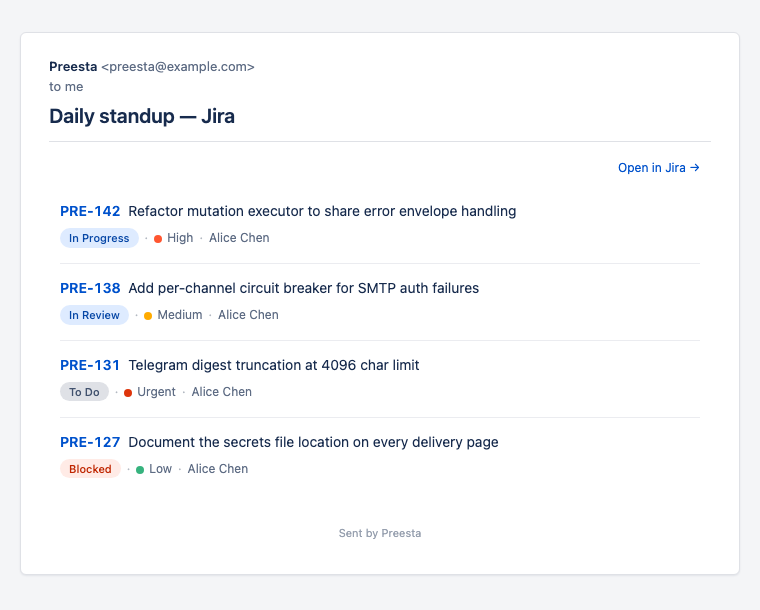
A single email per (To, Cc, Subject, Rule) package — see Routing model. Each one is:
- HTML body — the styled digest with status pills, priority dots, "Open in
→" headers - Plain-text body — same content rendered for text-only clients (Telegram also uses this)
- Subject —
<SubjectPrefix> + rule.notify.subject. The prefix lives inApplication:subjectPrefixinappsettings.yaml— useful for[PREESTA]or[DEV]style tagging - From —
Smtp:From. Multiple Preesta deployments sharing one inbox should set distinctFromaddresses
Recipients
mailTo: and cc: accept comma-separated values, each either a literal email or a marker (assignee / reporter / creator). Literals stay literal. Markers resolve per issue and are how Preesta produces one digest per distinct assignee.
Troubleshooting
Common failure modes:
- Authentication failed (5.7.8) — wrong password or, for Gmail, you used your account password instead of an app password.
- Relay denied (5.7.1) —
Fromaddress is a domain the SMTP server isn't authorized to send for. - Connection refused — wrong host/port, or SSL/TLS mismatch. With the default
SecurityMode: Auto, Preesta picks the wire mode by port (465 = SSL-on-connect, 587/25 = STARTTLS-when-available). PinSecurityModeexplicitly only if your provider needs it. - No email but no error in logs either —
mailTo: assigneeagainst a tracker that returned no email for the assignee produces a package with no recipients, which SMTP silently skips. See Routing model → When the assignee has no email.